.png)

SETTINGS RENEWAL
DEVICE
Galaxy S5, S6
Note 4
ROLE
PROJECT LEAD
CONDUCT RESEARCH
USER KEY VALUE & SCENARIOS
TEAM
DESIGNERS (UX, UI, PROTOTYPING)
PRODUCT MANAGER
DEVELOPERS (H/W, S/W)
OVERVIEW
Every day, the user uses the Settings app, but it’s challenging to find the menu you want to use. This app walks
through the complex interactions, navigation, or features they can provide to the user.
As a UX designer and researcher, I was charged with rethinking and rebuilding our setting app from the ground up. I was tasked to redesign the old app, catching up to new standards, re-evaluate user flow, rebuild IA, and redesign visuals with visual designers.
RENEWAL PROJECT DESIGN PROCESS
Settings review workshop
(4 months)
Member : UX/UI, Usability, Terminology, Product planning, R&D and Verification team
Review all setting menu’s ordering/grouping/ usages
Count frequency of use
Research competitive cases
Restructure Setting IA
(1 month)
Restructure menu tree based on the results of setting workshop
Review all new setting menu’s with Workshop members
User test for the menu structure (2 months)
User test for new IA through a focus group interview
Check Google mandatory requirements issue
Review by overseas branch and carriers
Visualize menu icon & style
(2 months)
Design Grid / List view
Re-design setting menu
icon for grid view
Modify icon for consistency
REVIEW IA (Galaxy S4)
Setting app has too many depths, mixed up the menu by supported on Android OS and new menu by adding a new feature by Samsung. Users cannot find setting menu they want to use. Groups are not intuitive and predictable.

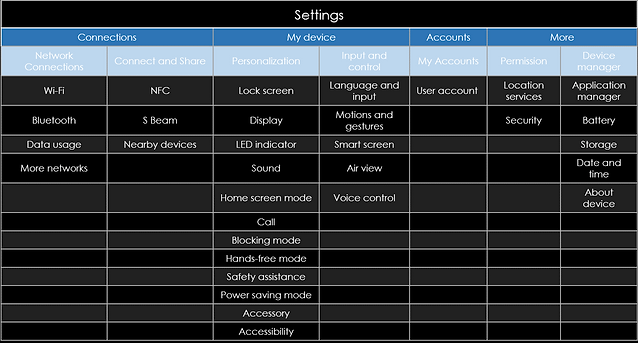
DESIGN INSIGHTS AND SOLUTIONS
Finding 1. Use only a few features but, hard to find
The user uses only a few menus in the complicated setting menu
Finding 2. LACK OF PERSONALIZATION
The setting app is very complex and has a variety of functions, but the functions used by each user are extremely limited.
Solution :
Per the result of reviewing the frequency of use and usage scenario, users use only a few setting menus.
“Quick menu” is needed for using quickly the frequently used menu.
Add “Search’ button on the application bar to be used whenever users don’t know the correct menu label
For reducing steps, the first depth(5 categories) is deleted.
Solution :
For user satisfaction, view mode is supported. Users can change the view mode, Grid / List view mode.
Insight :
Settings app is too boring for users
Solution :
For user satisfaction, view mode is supported. User can change the view mode, Grid / List view mode.
RENEW IA
A quick setting is added for using the frequently used menu easily.
First depth(Connect, My device, Accounts, More) was removed and 9 categories are supported. Among 4th and 5th depth menus, some items are relocated to upper depth as the result of used frequency. Some features are relocated for product competitiveness.

FINAL DESIGN


Quick settings
The quick settings is a new menu in the Settings menu, which has one main purpose: helping user accessing frequently used menus.
This screen allows any 12 items from settings to be placed at the top.

Search button and view mode
On the application bar, the search button is applied to search easily what users want to use.
Users can access to change view mode option in the Options menu. It supports List view/ Grid view for user wants.
New icon style
All icons are re-designed for grid style.


New grouping
‘Settings’ section of the Galaxy S5 consists of 9 categories: Quick Settings, Network Connections, Connect and Share, Sound and Display, Personalization, Motion, User and Backup, System, and Application.
Folded menu
As user needs, user can fold or unfold the 1st depth menu.

REFLECTION
It has been taken for granted that setting apps that contain settings of various functions applied to all terminals is difficult, complex and difficult to find. In the course of this project, many people have come to realize that starting with finding the settings they want to change, how to change them has a bigger problem with usability than the designer expects. In addition, as this project analyzed and redefined both Samsung code and Google code to the Samsung development team, the next project saw the process of quickly and accurately modifying the parts that need to be modified, I realized once again the importance of collaboration between the development-UX-verification department for usability.