.png)

ALWAYS ON DISPLAY
DEVICE
Galaxy S7, S8, S9
Note 7, 8
ROLE
PROJECT LEAD
CONDUCT RESEARCH
USER KEY VALUE & SCENARIOS
PROTOTYPE HIGH-FIDELITY MOCK-UP
TEAM
DESIGNERS (UX, UI, PROTOTYPING)
PRODUCT MANAGER
DEVELOPERS (H/W, S/W)
OVERVIEW
Always On Display (AOD) allows users to check the time and date with ease, and also keep an eye on missed calls and message alerts, even when the phone is not in use and just on standby. And, with its variety of clocks, calendars, and themes, the AOD also offers customization options. As a lead designer, I was charged with the task of research and think which information is valuable for users. Through the research, I distilled the collected data to extract insights, user pain points, and foundational functions to create a clear benchmark to build the app.
RESEARCH
Internal research was conducted to know user journeys through individual in-depth and focus group interviews. Habitually, users always press the home button to check various information. The average smartphone owner checks his or her device nearly 150 times a day. If the user can see the information whenever they please, there’s no need to turn on the device. For this use case, off-screen provides useful information.
Also, upon competitive analysis, However, the existing functions were not very frequently used by users. After reviewing the feedback of the actual users, there was negative feedback on the information that was recognized by sensors and temporarily displayed. If we reviewed these feedbacks very deeply thoroughly, providing more meaningful data than existing functions and modifying scenarios to meet user needs, we could predict the possibility of this function becoming a new flagship function in advance.


DESIGN INSIGHTS AND SOLUTIONS
1. Most users expect to use AOD screen in the substitution of a lock screen.
Display the right information users need without turning on the device. AOD screen can replace some features of the lock screen without turning on the device.
2. Users want a variety of customization features.
Users want to display and see their data (photo, memo, and music lyrics) at any time. But, they worry about the privacy issue when the phone is put on unprotected status. We consider the right way to support powerful customization functions, and also valuable information needs to be displayed and customizable to the users’ preferences.
3. There is anxiety that the AOD function consumes additional batteries.
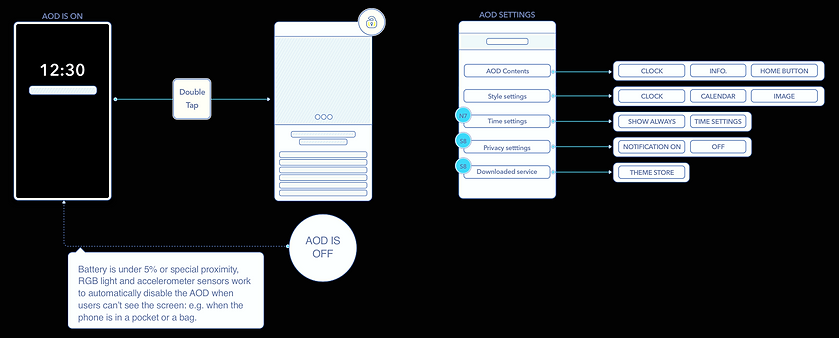
Battery consumption is significant because this feature needs to be enabled by default. Of course, the engineering team would consider the solution, but as a team, the design team reviewed the use scenario in detail, found a situation where the user could turn off the AOD function for a while and reflected it in the user flow. UX designers consider scenarios for turning off in unnecessary cases, while visual designers consider color and animation frames.
USER FLOW
User flow created two parts, screen and settings part. Simplified the screen and added user customization functions into the Settings part.
FINAL DESIGN


Display your AOD
Display clock, calendar, and image(background). AOD displays a relatively small amount of information compared with the phone’s normal mode. Nevertheless, designers determined an optimal number of frames to ensure that there is no compromise in display quality.
Galaxy S7_AOD setting


Galaxy S8_AOD setting


Powerful customization features
After launching Galaxy S7, most feedback was more customization (color, clock style and images).
For Note7, show notifications setting is supported for user privacy. Various clock style, and user customization tools are added.
For S8, time setting was added according to market feedback. Edge clock(Night clock) was a separate feature, but combining with AOD created a similar use case.
Screen off memo
With the new Screen Off Memo function, users do not need to launch an app to take notes. Instead, the phone’s S Pen is used to write directly on the Galaxy Note7’s off-screen.
Memos can also be pinned to the Always On Display. This allows users to check them at a later time by simply double-tapping the Memo icon. Users can also store these memos in the Samsung Notes app directly from the Always On Display.
Samsung Theme store


Downloaded from Samsung Themes
The growing demand for content from users has led to more work for designers internally. To solve this problem, we had many internal idea meetings and got the great idea to upload and share content created by releasing AOD API to existing Samsung theme stores so that users can use a lot of content in the end.
Initially, users could only choose from a few different clocks, add a calendar, and a few other things. Also, though, users have the entire Samsung theme store to choose from.
REFLECTION
Always on display project has brought a remarkable result. Always on Display project was applied to Galaxy S7 device for the first time, and value-added to the next devices. As a result, this feature became a major feature of Galaxy devices. As a UX leader, I coached and directed all UX issues from planning to launch to the market, and task force team was organized and the team took care of technical analysis, user research & test and designing workflows. After launching S7, the feature keeps evolving and is becoming the main feature for Galaxy devices.
Galaxy S20 Always on Display